Một môi trường cài đặt sạch, đúng phiên bản sẽ tiết kiệm cho bạn hàng chục giờ gỡ lỗi về sau. Bài này cài ROS 2 Humble theo đúng hướng dẫn chính thức và dựng sẵn khung workspace sẽ dùng xuyên suốt series.
- Cài được ROS 2 Humble trên Ubuntu 22.04 và kiểm tra hoạt động.
- Tạo workspace với các package chuẩn cho AGV, build bằng colcon.
- Hiểu underlay/overlay và dùng rosdep để cài phụ thuộc tự động.
1. Chọn đúng phiên bản
Mỗi bản ROS 2 gắn với một phiên bản Ubuntu (Tier 1). Cài lệch cặp sẽ phải build từ mã nguồn rất mất công.
| ROS 2 | Ubuntu | Hỗ trợ đến | Ghi chú |
|---|---|---|---|
| Humble Hawksbill (LTS) | 22.04 Jammy | 5/2027 | Dùng trong series, hệ sinh thái driver đầy đủ nhất |
| Jazzy Jalisco (LTS) | 24.04 Noble | 5/2029 | Chọn cho dự án mới kéo dài nhiều năm |
2. Cài ROS 2 Humble từ gói apt
# 1) Locale UTF-8
sudo apt update && sudo apt install -y locales
sudo locale-gen en_US en_US.UTF-8
sudo update-locale LC_ALL=en_US.UTF-8 LANG=en_US.UTF-8
export LANG=en_US.UTF-8

# 2) Bật kho universe và thêm khóa + kho ROS 2
sudo apt install -y software-properties-common curl
sudo add-apt-repository universe
sudo curl -sSL https://raw.githubusercontent.com/ros/rosdistro/master/ros.key \
     -o /usr/share/keyrings/ros-archive-keyring.gpg
echo "deb [arch=$(dpkg --print-architecture) signed-by=/usr/share/keyrings/ros-archive-keyring.gpg] \
http://packages.ros.org/ros2/ubuntu $(. /etc/os-release && echo $UBUNTU_CODENAME) main" \
  | sudo tee /etc/apt/sources.list.d/ros2.list > /dev/null

# 3) Cài bản desktop (có RViz2, demo) và công cụ build
sudo apt update && sudo apt upgrade -y
sudo apt install -y ros-humble-desktop ros-dev-tools

# 4) Nạp môi trường mỗi khi mở terminal
echo "source /opt/ros/humble/setup.bash" >> ~/.bashrc
source ~/.bashrc
Kiểm tra bằng cặp demo kinh điển ở hai terminal: ros2 run demo_nodes_cpp talker và ros2 run demo_nodes_py listener. Listener in ra "I heard: [Hello World: N]" nghĩa là DDS, C++ và Python đều chạy.
Cài sẵn các gói sẽ dùng trong series:
sudo apt install -y ros-humble-navigation2 ros-humble-nav2-bringup \
  ros-humble-slam-toolbox ros-humble-robot-localization \
  ros-humble-xacro ros-humble-joint-state-publisher-gui \
  ros-humble-teleop-twist-keyboard ros-humble-twist-mux \
  ros-humble-rmw-cyclonedds-cpp
3. Dựng workspace chuẩn cho AGV
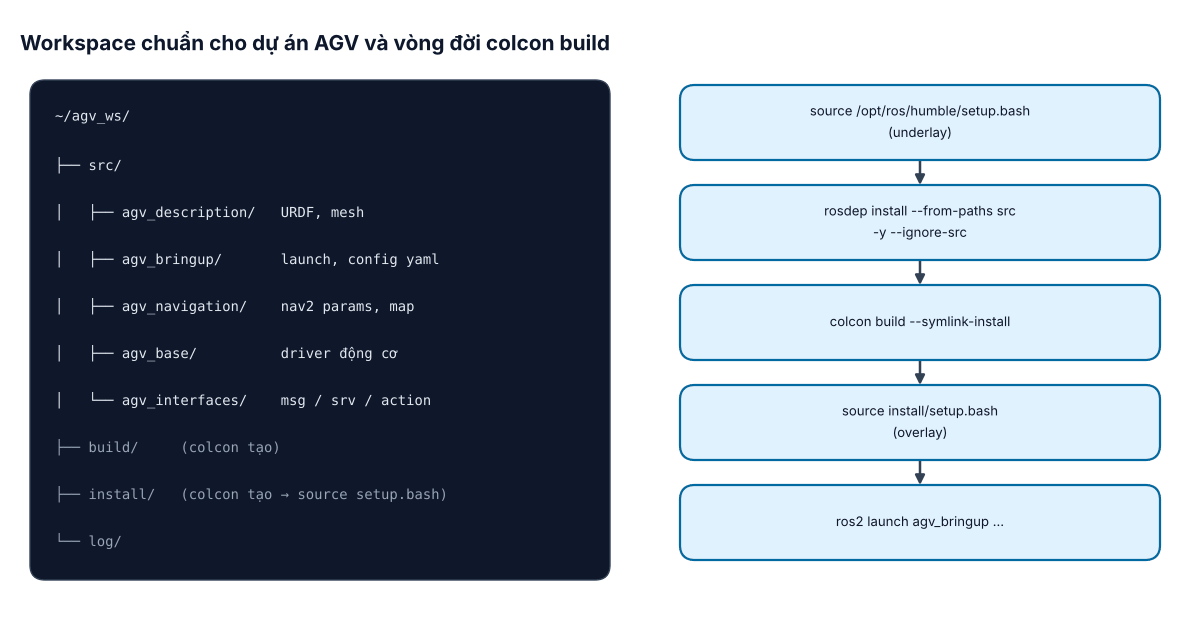
Workspace là một thư mục chứa mã nguồn các package bạn viết. Quy ước tách package theo chức năng giúp dự án lớn lên vẫn gọn:
mkdir -p ~/agv_ws/src && cd ~/agv_ws/src
ros2 pkg create agv_description --build-type ament_cmake
ros2 pkg create agv_bringup     --build-type ament_cmake
ros2 pkg create agv_navigation  --build-type ament_cmake
ros2 pkg create agv_interfaces  --build-type ament_cmake
ros2 pkg create agv_base --build-type ament_python \
     --dependencies rclpy geometry_msgs nav_msgs --node-name base_driver

cd ~/agv_ws
sudo rosdep init        # chỉ chạy lần đầu trên máy
rosdep update
rosdep install --from-paths src --ignore-src -y --rosdistro humble
colcon build --symlink-install
source install/setup.bash
ros2 run agv_base base_driver
--symlink-install tạo liên kết thay vì sao chép file Python, launch, yaml – sửa xong chạy lại ngay, không phải build lại. Package chỉ chứa launch/config/URDF nên dùng kiểu ament_cmake và khai báo cài thư mục trong CMakeLists.txt:
install(DIRECTORY launch config urdf
  DESTINATION share/${PROJECT_NAME})
4. Underlay và overlay
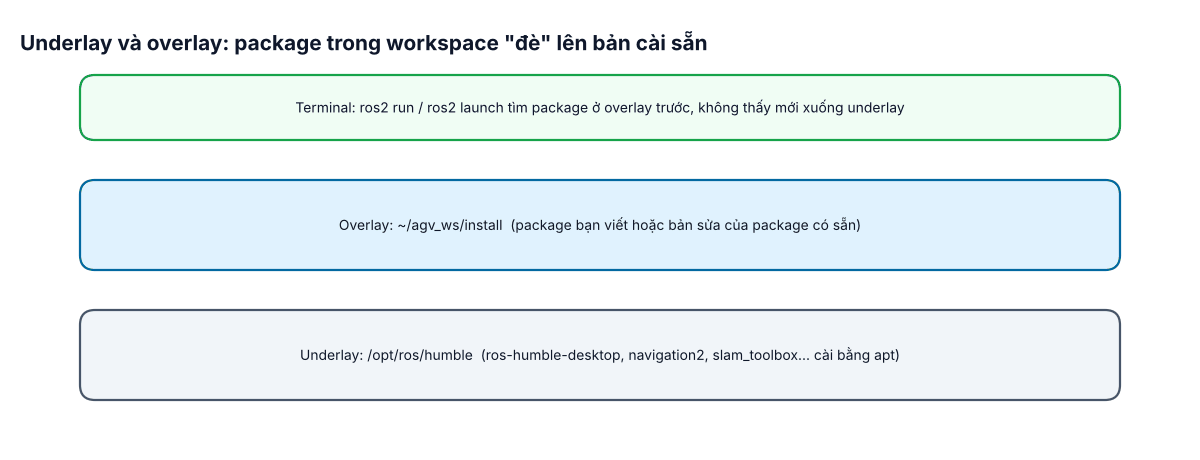
Khi bạn source install/setup.bash, workspace trở thành overlay nằm trên underlay /opt/ros/humble. Nếu bạn clone mã nguồn một package có sẵn (ví dụ để sửa lỗi driver) vào src/, bản trong overlay sẽ được dùng thay bản apt. Đây là cách sửa nhanh một package mà không đụng vào hệ thống.
~/.bashrc. Khi có lỗi lạ, mở terminal mới, chỉ source /opt/ros/humble/setup.bash rồi install/setup.bash của đúng workspace.5. Công cụ dòng lệnh dùng hằng ngày
| Lệnh | Dùng để |
|---|---|
ros2 node list / ros2 node info /amcl | Xem node đang chạy và các topic nó dùng |
ros2 topic list -t / ros2 topic echo /odom | Liệt kê topic kèm kiểu, xem nội dung |
ros2 topic hz /scan | Đo tần số thực tế của cảm biến |
ros2 param list / ros2 param get | Đọc, sửa tham số khi chạy |
ros2 doctor --report | Kiểm tra cấu hình mạng, phiên bản, cảnh báo môi trường |
rqt_graph, rviz2 | Xem đồ thị node, hiển thị dữ liệu 3D |
6. Lỗi thường gặp khi cài đặt
- "Package 'xxx' not found": chưa source overlay, hoặc package chưa cài thư mục vào
share/. - Talker/listener hai máy không thấy nhau: khác
ROS_DOMAIN_ID, tường lửa chặn UDP, hoặc mạng Wi-Fi chặn multicast (giải pháp ở bài #22). - rosdep báo "cannot locate rosdep definition": khai báo sai tên phụ thuộc trong
package.xml; tra tên chuẩn bằngrosdep resolve. - Lỗi setuptools khi build Python package: trên Humble nên giữ setuptools bản của Ubuntu 22.04, tránh
pip install -U setuptoolstoàn hệ thống.