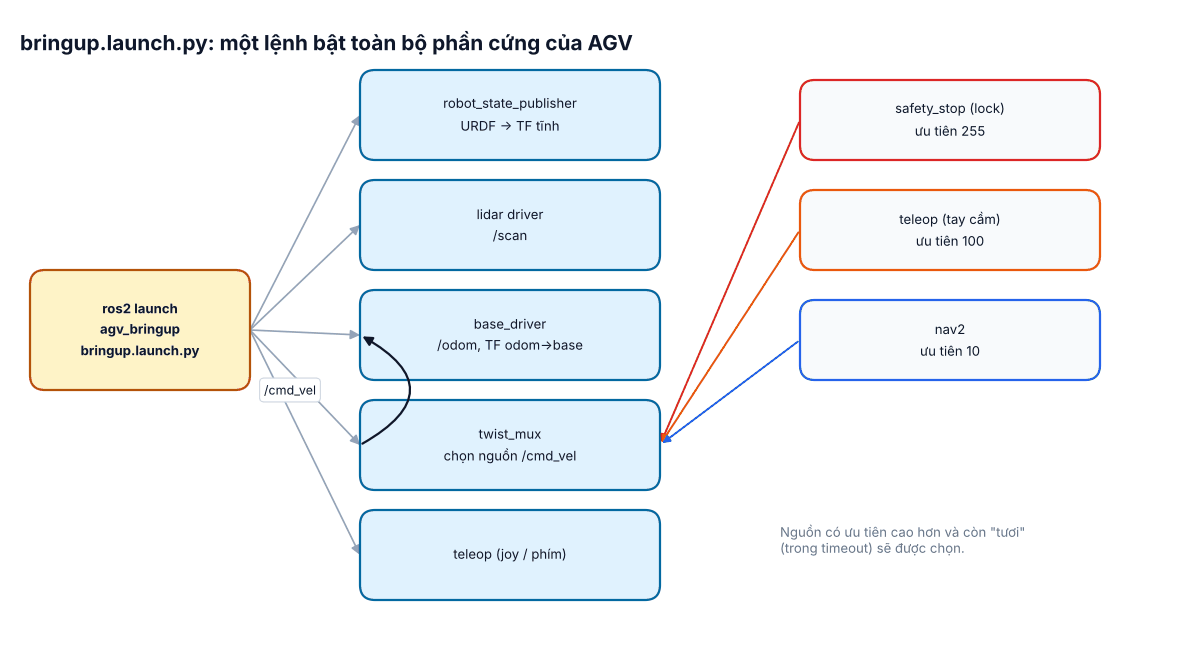
"Bringup" là bước đưa phần cứng lên ROS: một lệnh launch bật toàn bộ node cần thiết để xe có TF, odometry, dữ liệu lidar và nhận lệnh lái tay. Đây cũng là lúc xe lần đầu chuyển động theo lệnh phần mềm – thời điểm rủi ro nhất, nên an toàn phải thiết kế ngay từ đầu.
- Viết launch file Python có tham số, gom nhiều node.
- Cấu hình twist_mux cho nhiều nguồn lệnh vận tốc có ưu tiên.
- Cài watchdog trong driver và chạy checklist an toàn lần đầu.
1. Thành phần của bringup
| Node | Vai trò | Đầu ra chính |
|---|---|---|
| robot_state_publisher | Đọc URDF, phát TF tĩnh các cảm biến | /tf_static, /robot_description |
| base_driver | Nói chuyện với driver động cơ (CAN, RS485, UART tới vi điều khiển) | /odom, TF odom→base_link |
| lidar driver | Đọc lidar, đóng dấu thời gian | /scan |
| twist_mux | Chọn một trong nhiều nguồn lệnh theo ưu tiên | /cmd_vel đưa vào driver |
| teleop | Lái tay bằng tay cầm hoặc bàn phím | /cmd_vel_teleop |
2. Launch file
# agv_bringup/launch/bringup.launch.py
import os
from ament_index_python.packages import get_package_share_directory
from launch import LaunchDescription
from launch.actions import DeclareLaunchArgument
from launch.substitutions import Command, LaunchConfiguration
from launch_ros.actions import Node
from launch_ros.parameter_descriptions import ParameterValue


def generate_launch_description():
    desc = get_package_share_directory('agv_description')
    bring = get_package_share_directory('agv_bringup')
    xacro_file = os.path.join(desc, 'urdf', 'agv.urdf.xacro')
    use_sim_time = LaunchConfiguration('use_sim_time')

    robot_description = ParameterValue(Command(['xacro ', xacro_file]), value_type=str)

    return LaunchDescription([
        DeclareLaunchArgument('use_sim_time', default_value='false'),
        Node(package='robot_state_publisher', executable='robot_state_publisher',
             parameters=[{'robot_description': robot_description, 'use_sim_time': use_sim_time}]),
        Node(package='agv_base', executable='base_driver', name='base_driver',
             parameters=[os.path.join(bring, 'config', 'base.yaml')]),
        Node(package='rplidar_ros', executable='rplidar_composition', name='lidar',
             parameters=[{'serial_port': '/dev/agv_lidar', 'frame_id': 'laser'}]),
        Node(package='twist_mux', executable='twist_mux',
             parameters=[os.path.join(bring, 'config', 'twist_mux.yaml')],
             remappings=[('/cmd_vel_out', '/cmd_vel')]),
])/dev/ttyUSB0, /dev/ttyUSB1 sau mỗi lần khởi động. Tạo luật udev theo số serial để luôn có /dev/agv_lidar, /dev/agv_motor.3. twist_mux: ai được quyền lái?
Trên xe thật có nhiều nguồn lệnh: Nav2, tay cầm của kỹ thuật viên, node an toàn muốn khóa xe. twist_mux nhận tất cả và chỉ chuyển tiếp nguồn có ưu tiên cao nhất đang còn hoạt động (có tin mới trong khoảng timeout). Topic khóa (lock) có ưu tiên cao hơn sẽ chặn mọi nguồn thấp hơn khi nó phát true.
# agv_bringup/config/twist_mux.yaml
twist_mux:
  ros__parameters:
    topics:
      navigation:
        topic: cmd_vel_nav
        timeout: 0.5
        priority: 10
      joystick:
        topic: cmd_vel_teleop
        timeout: 0.5
        priority: 100
    locks:
      safety_stop:
        topic: safety_stop
        timeout: 0.0       # 0 = không hết hạn, giữ trạng thái cuối
        priority: 255
Khi đó Nav2 cần remap đầu ra sang cmd_vel_nav, teleop phát lên cmd_vel_teleop: ros2 run teleop_twist_keyboard teleop_twist_keyboard --ros-args -r cmd_vel:=cmd_vel_teleop.
4. Watchdog trong driver
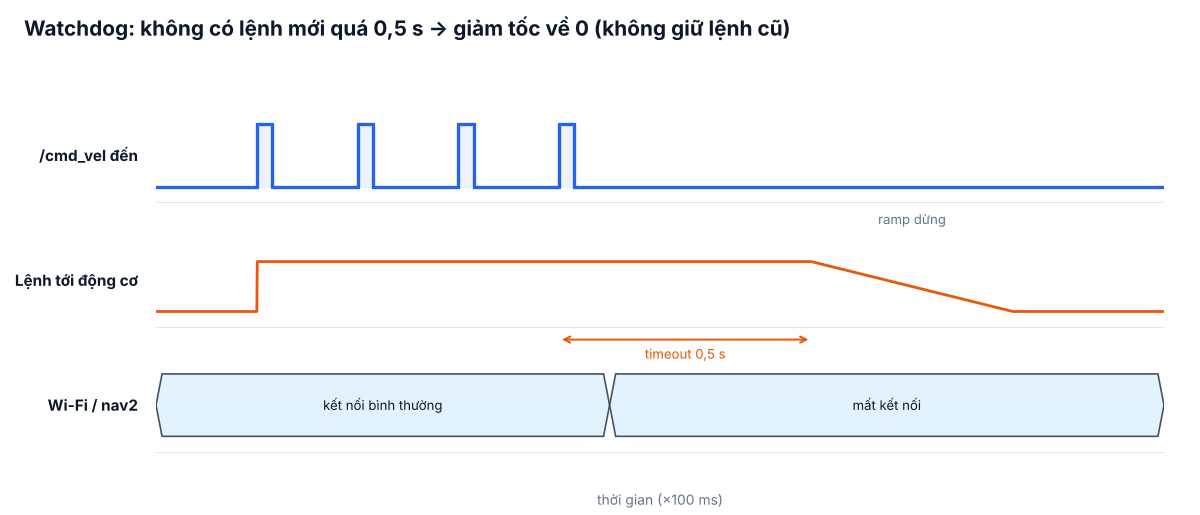
Nếu Wi-Fi rớt hay Nav2 treo, lệnh vận tốc cuối cùng có thể bị giữ mãi – xe chạy thẳng vào tường. Driver đế xe bắt buộc có watchdog: quá thời gian không nhận lệnh mới thì giảm tốc về 0 có kiểm soát.
import time
import rclpy
from rclpy.node import Node
from geometry_msgs.msg import Twist


class BaseDriver(Node):
    def __init__(self):
        super().__init__('base_driver')
        self.declare_parameter('cmd_timeout', 0.5)     # s
        self.declare_parameter('max_accel', 0.5)       # m/s^2
        self.declare_parameter('max_speed', 1.0)       # m/s
        self.target = Twist()
        self.v_out = 0.0
        self.w_out = 0.0
        self.last_cmd = 0.0
        self.create_subscription(Twist, 'cmd_vel', self.on_cmd, 1)
        self.dt = 0.02
        self.create_timer(self.dt, self.control)       # 50 Hz

    def on_cmd(self, msg):
        self.target = msg
        self.last_cmd = time.monotonic()

    def control(self):
        timeout = self.get_parameter('cmd_timeout').value
        a = self.get_parameter('max_accel').value
        vmax = self.get_parameter('max_speed').value
        stale = time.monotonic() - self.last_cmd > timeout
        v_goal = 0.0 if stale else max(-vmax, min(vmax, self.target.linear.x))
        w_goal = 0.0 if stale else self.target.angular.z
        step = a * self.dt
        self.v_out += max(-step, min(step, v_goal - self.v_out))     # giới hạn gia tốc
        self.w_out = w_goal if not stale else self.w_out * 0.8
        self.send_to_motors(self.v_out, self.w_out)

    def send_to_motors(self, v, w):
        pass   # động học nghịch (bài #6) rồi gửi xuống driver động cơ


def main():
    rclpy.init()
    rclpy.spin(BaseDriver())
Tốt nhất nên có thêm một lớp watchdog nữa trong vi điều khiển/driver động cơ (ví dụ CAN heartbeat): nếu máy tính treo hoàn toàn, phần cứng vẫn tự dừng.
5. Checklist an toàn trước lần chạy đầu
| # | Kiểm tra | Cách làm |
|---|---|---|
| 1 | Kê bánh khỏi mặt đất | Chạy thử lệnh tiến/lùi/xoay, quan sát chiều quay từng bánh |
| 2 | Nút dừng khẩn hoạt động bằng phần cứng | Nhấn E-stop khi bánh đang quay: điện động lực phải bị cắt, không phụ thuộc phần mềm |
| 3 | Giới hạn tốc độ thấp | Đặt max_speed 0,2–0,3 m/s cho giai đoạn thử |
| 4 | Watchdog | Đang lái tay thì tắt teleop / rút Wi-Fi: xe phải dừng trong khoảng timeout + quãng phanh |
| 5 | TF và hướng trục | RViz: đẩy tay xe về phía trước, /odom x phải tăng; xoay trái, yaw phải tăng |
| 6 | Lidar đúng hướng | Đặt vật ở phía trước – điểm quét phải nằm trước mũi xe trong RViz |
| 7 | Khu vực thử | Rào chắn, người vận hành cầm E-stop không dây trong tầm tay |
6. Lỗi thường gặp
- Xe chạy ngược chiều lệnh: đảo dấu bánh trong driver, không "sửa" bằng cách đảo TF.
- Xe giật khi bắt đầu/dừng: thiếu giới hạn gia tốc; Nav2 có
velocity_smoothernhưng driver vẫn nên tự giới hạn. - twist_mux không chuyển tiếp lệnh: lock đang ở trạng thái khóa, hoặc tên topic nguồn không khớp yaml.
- Launch chạy được trên laptop nhưng không chạy trên xe: quyền truy cập cổng serial – thêm user vào nhóm
dialout.